Affiliate links Product links go to Crawfords Metal Detectors and earn Paul a commission at no extra cost to you.
 Minelab Manticore Audio themes

Minelab Manticore audio themes and threshold settings explained
Looking at what are the choices of settings for Normal audio, enhanced audio, depth audio , threshold levels including a reference threshold, True threshold tones and more.
to help you set up your minelab manticore.
The Normal Audio Theme
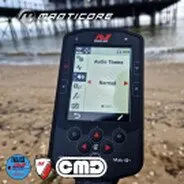
Is a good choice for everyday detecting. It gives full sounding audio responses that vary in both pitch and volume.
The pitch of audio responses is determined by the Target ID as defined by the Target Tones setting
The volume of audio responses is modulated according to the signal strength/depth of the target.
With strong/shallow targets giving a louder response than a smaller or deeper target.
Enhanced Audio Theme
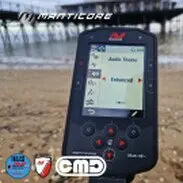
Is similar to Normal, but is optimised for detecting in high EMI scenarios.
Weak detection like EMI chatter will remain audible,
but will have a modulated audio sound that will sound more
'thin' or 'tinny' than stronger detections (similar to using the filter in the stabiliser feature)
This has the effect of suppressing EMI chatter, making it easier to listen
through, to hear non random signals that consistently repeat with each swing.
Larger signals from strong/shallow targets will sound more prompt, similar to the Normal Audio Theme.
This Audio Theme can also allow users to increase Sensitivity (in EMI-limited locations) higher than would be possible using the Normal Audio Theme (should you not want to use the Stabiliser Feature)
The pitch of audio responses is determined by the Target ID
as defined by the Target Tones setting.
Choose the amount of frequency modulation by changing
the Profile.
This Theme uses a Reference threshold tone that blanks for rejected targets when used with FERROUS LIMITS and DISCRIMINATION.
The Depth Audio Theme.
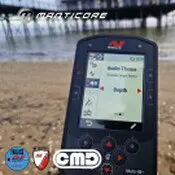
Is useful for improved target separation at land sites that contain high amounts of ferrous content.
The Target Tones setting is disabled when using
the Depth Audio Theme. This is the 1 region all tones 2 regions all tones and also the normal tone settings.
To enable Target Tones, change the Audio Theme to Normal or Enhanced.
If used with a low conductor mode and higher recovery speed this is a superb tone profiles for detecting very small targets, but will not suit everybodys detecting style.
The pitch of non‑ferrous targets varies continuously according to the signal strength or depth of the target. (I like to use a Min pitch of 25 and Max of 64)
Weaker non‑ferrous signals will have a lower pitch and stronger signals will have a higher pitch. Ferrous targets will have a low pitch response.
The Ferrous Pitch Minimum Pitch (non‑ferrous) and Maximum Pitch (non‑ferrous) are adjustable. The amount of volume modulation can be modified using the
Profile setting.
This theme uses a Reference threshold tone that blanks for rejected targets.
You can adjust the Threshold Level and Threshold Pitch.
The Depth Theme Pitch Settings
The Depth theme has additional unique settings that allow you to control the pitch of ferrous tones, and to set the minimum and maximum pitch of conductive tones.
The Depth pitch settings have a range from 1 to 64.
The Ferrous Pitch cannot be set higher than the Min Pitch.
If you cannot adjust the Ferrous Pitch (the arrows are greyed out and there is an invalid button press tone)
Inside the audio theme settings are also some more audio settings.
The Profile setting for an Audio Theme controls how much
the audio signal is modulated for signal strength (or target depth).
In Normal and Depth Audio Themes, the volume of the audio is modulated (weaker targets have lower volume).
In Enhanced Audio Theme, the frequency content of the audio is modulated (weaker targets sound tinnier).
Simple.
When the Profile is set to Simple, there is minimal modulation of weak/deep targets.
All but the weakest ordeepest targets will sound similar to shallow/strong targets.
Medium.
When the Profile is set to Medium, there is a moderate amount of modulation applied.
Medium depth to weakest and deepest targets will sound different to very shallow and loud targets.
Rich.
When the Profile is set to Rich, there is a large amount of modulation applied. Weakest and deepest targets will sound different to medium depth targets and both of these will also sound different to very shallow and strong targets.
These Audio themes are NOT AVAILABLE in the prosecting mode.
Prospecting Theme
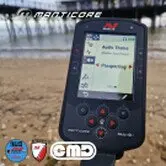
Is useful when maximum sensitivity to weak targets is beneficial, such as for gold prospecting or hunting for fine jewellery at the beach.
This theme is best used at low trash sites. as it is quite suseptible to detecting coke.
The Target Tones setting (as Mentioned Above) is disabled when using the Prospecting Audio Theme.
To enable Target Tones change the Audio Theme to Normal or Enhanced.
The pitch of audio responses varies continuously according to the signal strength (or depth) of the target, and whether it is ferrous.
The Ferrous Tone setting allows the ferrous tones to be turned Off. This means that when detecting in All Metal, ferrous targets will not give a ferrous tone, and instead will give a regular detection tone. This is a useful feature when searching for gold, because very weak gold targets can be pulled into the ferrous region by nearby ferrous targets or by the ground signal from highly mineralised ground. By
turning Ferrous Tones Off, the gold signals will be more clearly audible.
This theme uses a True Threshold Tone that provides maximum sensitivity to weak targets. You can adjust the threshold level and pitch to suit you.
As always when you 1st start you journey with the minelab manticore, it is best to start out with the PRESET modes, and as you gain experience the start to change settings to suit you.
Check out the video on where to find all these settings and how to change them.
Gear mentioned in this article (Crawfords MD)

Buy at Crawfords MD
Minelab Manticore
Check price & stock- Compare at Crawfords
- Equinox 900 vs Manticore
- Manticore vs XP Deus 2
- Top Manticore accessories

About the author
Minelab Detexpert, field tester and Crawfords Metal Detectors ambassador. Paul posts a new detecting video most weeks and prefers the beach. The finds are younger, but old coins tend to come out in better condition.